Environment Variables
Configure your project through environment variables to enable all required third-party integration services
Environment Variable System Overview
VibeAny supports two ways to configure environment variables:
- Via environment variable files — for values that rarely change, such as database connection URLs and auth secrets.
- Via the admin config panel — for values that change frequently. VibeAny provides a dynamic config panel where you can modify variables at any time, such as payment keys and email server settings.
Configuration via Environment Variable Files
Site URL Configuration
| Variable | Description |
|---|---|
| VITE_APP_URL | Site URL |
Database
See the database setup documentation for more detailed instructions.
| Variable | Description |
|---|---|
| DATABASE_URL | Database connection URL |
Authentication
See the authentication setup documentation for more detailed instructions.
| Variable | Description |
|---|---|
| ADMIN_EMAILS | Admin email addresses |
| BETTER_AUTH_SECRET | Auth secret key |
| BETTER_AUTH_URL | Auth URL |
BETTER_AUTH_SECRET can be generated on the better-auth website, or click the button below to generate one:
If you want to use OAuth (GitHub or Google login), configure the following:
| Variable | Description |
|---|---|
| GITHUB_CLIENT_ID | GitHub OAuth Client ID |
| GITHUB_CLIENT_SECRET | GitHub OAuth Client Secret |
| GOOGLE_CLIENT_ID | Google OAuth Client ID |
| GOOGLE_CLIENT_SECRET | Google OAuth Client Secret |
TURNSTILE
VibeAny uses TURNSTILE as a captcha service to protect your website. You need to register an account on the TURNSTILE website and create a site to get the site key. See the captcha setup documentation for more details.
| Variable | Description |
|---|---|
| TURNSTILE_SECRET_KEY | TURNSTILE secret key, can be generated in the Cloudflare Dashboard |
| VITE_TURNSTILE_SITE_KEY | TURNSTILE site key, can be obtained from the Cloudflare Dashboard |
| VITE_TURNSTILE_CAPTCHA_ENABLED | Enable TURNSTILE captcha, true to enable, false to disable |
You can use the Resend service or a custom email server. VibeAny recommends using Resend. See the email setup documentation for more details.
Email verification is disabled by default. Configure an email provider so users can verify their accounts:
EMAIL_VERIFICATION_ENABLED=falseFor Resend, you need to create an API key at Resend.
| Variable | Description |
|---|---|
| EMAIL_PROVIDER | Email provider, resend or custom |
| EMAIL_FROM | Sender email, e.g.: VibeAny <[email protected]> |
| RESEND_API_KEY | Resend API key |
For a custom email server, configure the following variables. Refer to your email provider's documentation for details:
| Variable | Description |
|---|---|
| EMAIL_HOST | Email server host |
| EMAIL_ADDRESS | Sender email address |
| EMAIL_USER | Sender username |
| EMAIL_PASSWORD | Sender password |
Payment
See the payment setup documentation for more details.
Stripe
| Variable | Description |
|---|---|
| VITE_STRIPE_PUBLISHABLE_KEY | Stripe publishable key |
| STRIPE_SECRET_KEY | Stripe API secret key |
| STRIPE_WEBHOOK_SECRET | Stripe webhook secret |
| VITE_STRIPE_PRO_MONTHLY_PRICE_ID | Stripe pro monthly price ID |
| VITE_STRIPE_PRO_YEARLY_PRICE_ID | Stripe pro yearly price ID |
| VITE_STRIPE_LIFETIME_PRICE_ID | Stripe lifetime price ID |
Creem
| Variable | Description |
|---|---|
| CREEM_X_API_KEY | Creem API key |
| CREEM_TEST_MODE | Creem test mode, true to enable, false to disable |
| CREEM_WEBHOOK_SECRET | Creem webhook secret |
| VITE_CREEM_PRO_MONTHLY_PRODUCT_ID | Creem pro monthly product ID |
| VITE_CREEM_LIFETIME_PRODUCT_ID | Creem lifetime product ID |
Credits
To simplify developer configuration, VibeAny integrates the credit system into the admin panel. You can modify credit settings at any time in the admin config panel, such as credit amounts and expiration periods. See the credit setup documentation for more details.
Storage
See the storage setup documentation for more details.
| Variable | Description |
|---|---|
| STORAGE_PROVIDER | Storage provider, s3 or custom |
| S3_ACCESS_KEY | S3 access key |
| S3_SECRET_KEY | S3 secret key |
| S3_REGION | S3 region |
| S3_BUCKET | S3 bucket |
Configuration via Admin Panel
VibeAny provides a dynamic config panel where you can modify the following settings at any time without restarting the service.
Priority Note
Environment variable file configuration takes priority over the admin panel:
- Server-side config: If
.envhasSTRIPE_SECRET_KEY=sk_xxx, the admin panel'spayment_stripe_secret_keywill be ignored - Client-side config (
public_prefix): If.envhasVITE_CREDIT_ENABLE=true, the admin panel'spublic_credit_enablewill be ignored
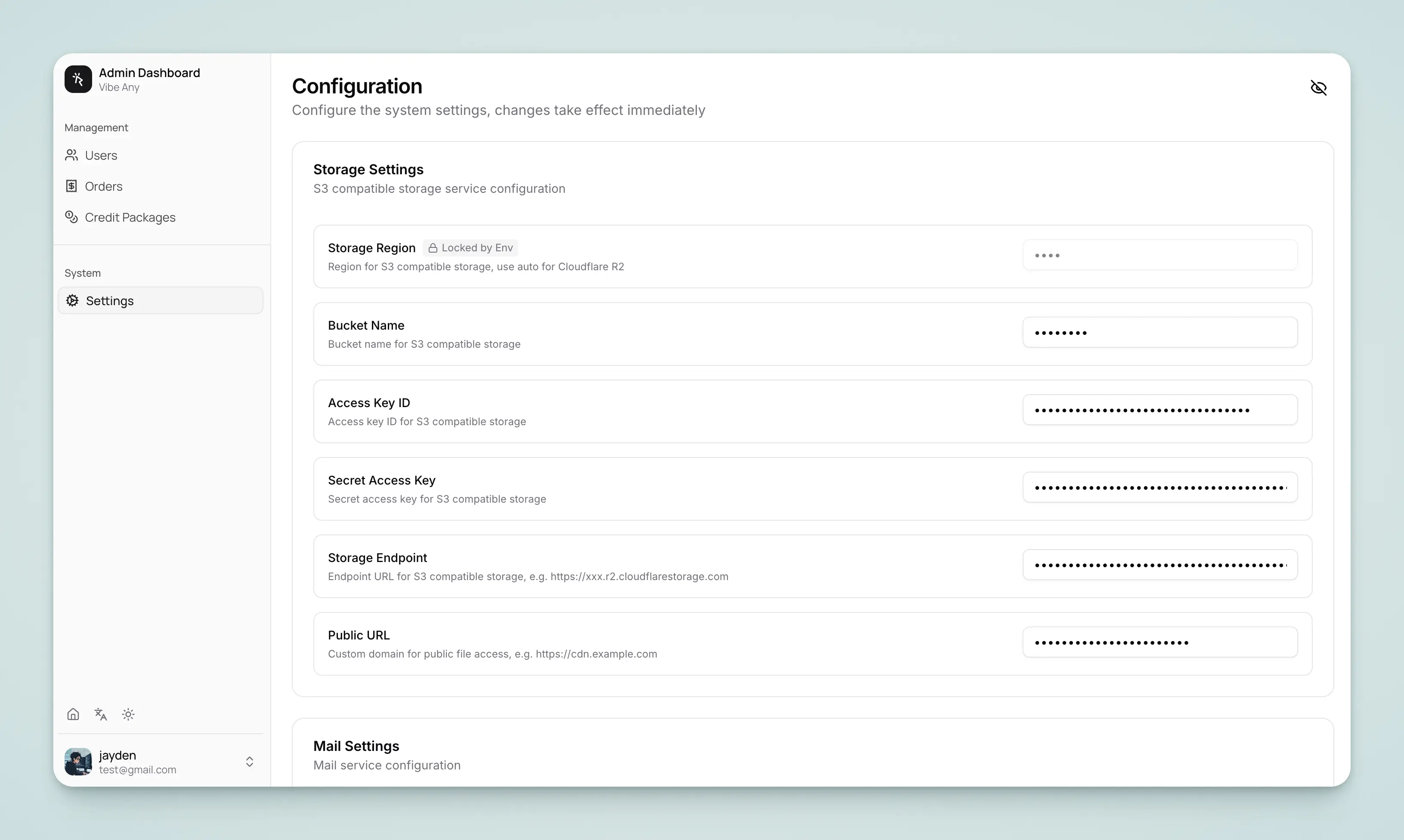
Payment
You can select the payment provider in the admin panel: stripe, creem, paypal, wechat, alipay
Stripe
| Config Item | Environment Variable |
|---|---|
| Stripe Secret Key | STRIPE_SECRET_KEY |
| Stripe Webhook Secret | STRIPE_WEBHOOK_SECRET |
Creem
| Config Item | Environment Variable |
|---|---|
| Creem X API Key | CREEM_X_API_KEY |
| Creem Test Mode | CREEM_TEST_MODE |
| Creem Webhook Secret | CREEM_WEBHOOK_SECRET |
PayPal
| Config Item | Environment Variable |
|---|---|
| PayPal Client ID | PAYPAL_CLIENT_ID |
| PayPal Client Secret | PAYPAL_CLIENT_SECRET |
| PayPal Webhook ID | PAYPAL_WEBHOOK_ID |
| PayPal Sandbox Mode | PAYPAL_SANDBOX |
WeChat Pay
| Config Item | Environment Variable |
|---|---|
| WeChat App ID | WECHAT_APP_ID |
| WeChat Merchant ID | WECHAT_MCH_ID |
| WeChat API Key | WECHAT_API_KEY |
| WeChat API v3 Key | WECHAT_API_V3_KEY |
| WeChat Certificate Serial No | WECHAT_SERIAL_NO |
| WeChat Private Key | WECHAT_PRIVATE_KEY |
Alipay
| Config Item | Environment Variable |
|---|---|
| Alipay App ID | ALIPAY_APP_ID |
| Alipay App Private Key | ALIPAY_PRIVATE_KEY |
| Alipay Public Key | ALIPAY_PUBLIC_KEY |
| Alipay Sandbox Mode | ALIPAY_SANDBOX |
Credits
Basic Configuration
| Config Item | Environment Variable | Default |
|---|---|---|
| Enable Credit System | VITE_CREDIT_ENABLE | false |
| Allow Free Users to Purchase | VITE_CREDIT_ALLOW_FREE_USER_PURCHASE | false |
Sign-up Bonus
| Config Item | Environment Variable | Default |
|---|---|---|
| Enable Sign-up Bonus | VITE_CREDIT_SIGNUP_BONUS_ENABLED | false |
| Sign-up Bonus Amount | VITE_CREDIT_SIGNUP_BONUS_AMOUNT | 0 |
| Bonus Expiration (days) | VITE_CREDIT_SIGNUP_BONUS_EXPIRE_DAYS | 30 |
Daily Bonus
| Config Item | Environment Variable | Default |
|---|---|---|
| Enable Daily Bonus | VITE_CREDIT_DAILY_ENABLED | false |
| Daily Bonus Amount | VITE_CREDIT_DAILY_AMOUNT | 0 |
| Config Item | Environment Variable | Default |
|---|---|---|
| Email Provider | EMAIL_PROVIDER | resend |
| Sender Email | EMAIL_FROM | - |
| Resend API Key | RESEND_API_KEY | - |
Storage
VibeAny supports S3-compatible storage services (e.g., AWS S3, Cloudflare R2, MinIO).
| Config Item | Environment Variable | Default |
|---|---|---|
| Storage Region | STORAGE_REGION | auto |
| Bucket Name | STORAGE_BUCKET_NAME | - |
| Access Key ID | STORAGE_ACCESS_KEY_ID | - |
| Secret Access Key | STORAGE_SECRET_ACCESS_KEY | - |
| Storage Endpoint | STORAGE_ENDPOINT | - |
| Public Access URL | STORAGE_PUBLIC_URL | - |